
Is 8GB actually enough for a midrange GPU after all?
We've all heard that 8GB just isn't enough memory anymore. But what if 8GB is somehow still enough in 2026?
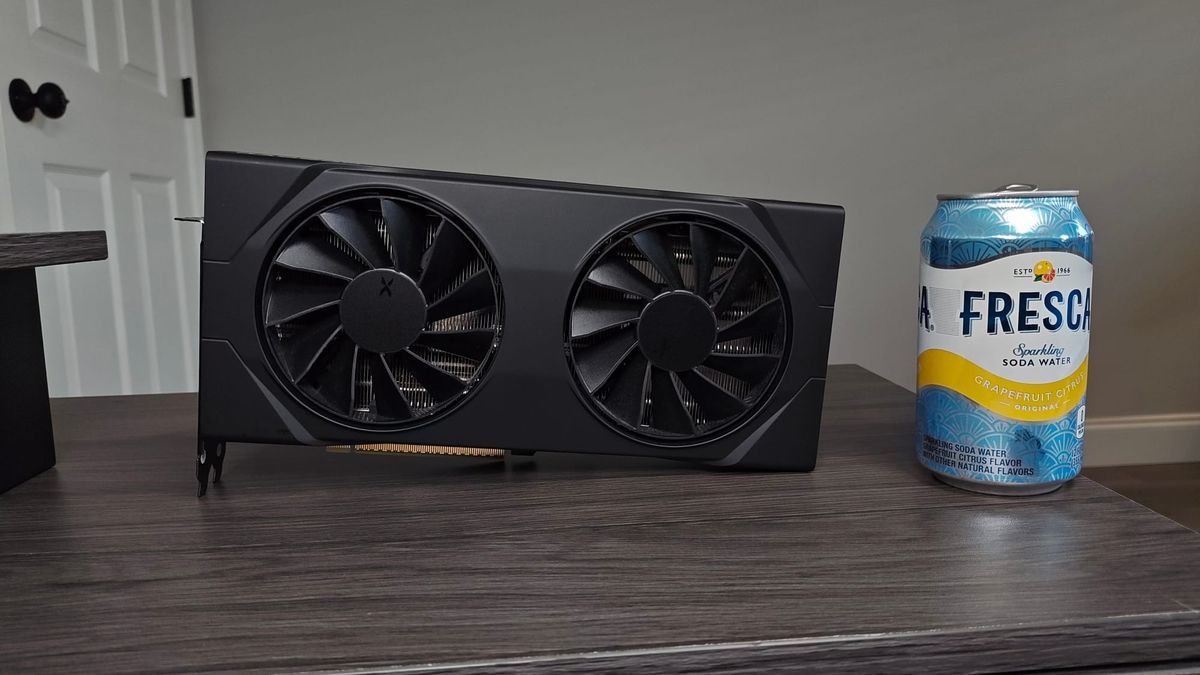
We’ve all heard that you shouldn’t be buying a modern 8GB GPU because 8GB isn’t nearly enough memory for today’s powerful graphics chips, and running out of memory causes tons of performance issues. It makes sense, GPUs from a decade ago that are considered slow by today's standards had 8GB of memory. It seems like a mistake to get the 9060 XT 8GB or 5060 Ti 8GB.
I knew that about a year ago, and yet I bought an RX 9060 XT 8GB, which is the cheapest 9000 series GPU AMD sells. It was on a really good sale for about $250, while the 16GB model was going for over $400, so I was happy to lose some performance to save that much money. The cheapest 9060 XT 8GB I can find right now is $350 so I think I was actually pretty lucky.
My 9060 XT has been running in my HTPC for a year now and while the performance isn't great at 4K, where it would be the most likely to run out of memory, performance at 1440p is pretty good. I've been pretty content with the gaming experience, especially since I probably won't be upgrading any time soon.
Then I saw some testing done by Hardware Unboxed, where they showed how the 9060 XT 8GB ran significantly faster on PCIe 5.0 than 4.0 in games. The results make sense, because GPUs have dedicated memory so that they can access the data they need quickly. When the amount of data is greater than the GPU’s memory capacity, the GPU has to grab the data it needs from system RAM, which requires communicating over the PCIe connection that connects the GPU to the rest of the PC.
Given that my own 9060 XT is running off of a PCIe 4.0 riser cable, I immediately thought there was a pretty distinct possibility that I was leaving lots of performance on the table. But it would only be like a $50 or $60 purchase to get the kind of PCIe 5.0 riser that would work for my HTPC, which isn't much to speed up a PC.
On the other hand, the games HUB tested were all pretty new and ran with some pretty intensive graphics settings, which would be more likely to push a graphics card a little too far. Meanwhile, most of the games I play are either older AAA titles or newer but AA or indie. I’ve never really suspected I’ve run into performance issues due to running out of memory or because my 9060 XT is running with PCIe 4.0 instead of 5.0.
So I decided to see for myself if I had anything to gain from upgrading to PCIe 5.0, just to be sure. The problem is, I don’t have a PCIe 5.0 riser, so benchmarking this meant I had to plug the GPU directly into the motherboard, something that you’re not supposed to do in the ITX case I use. So I had to pull out the motherboard and put it on top of something.
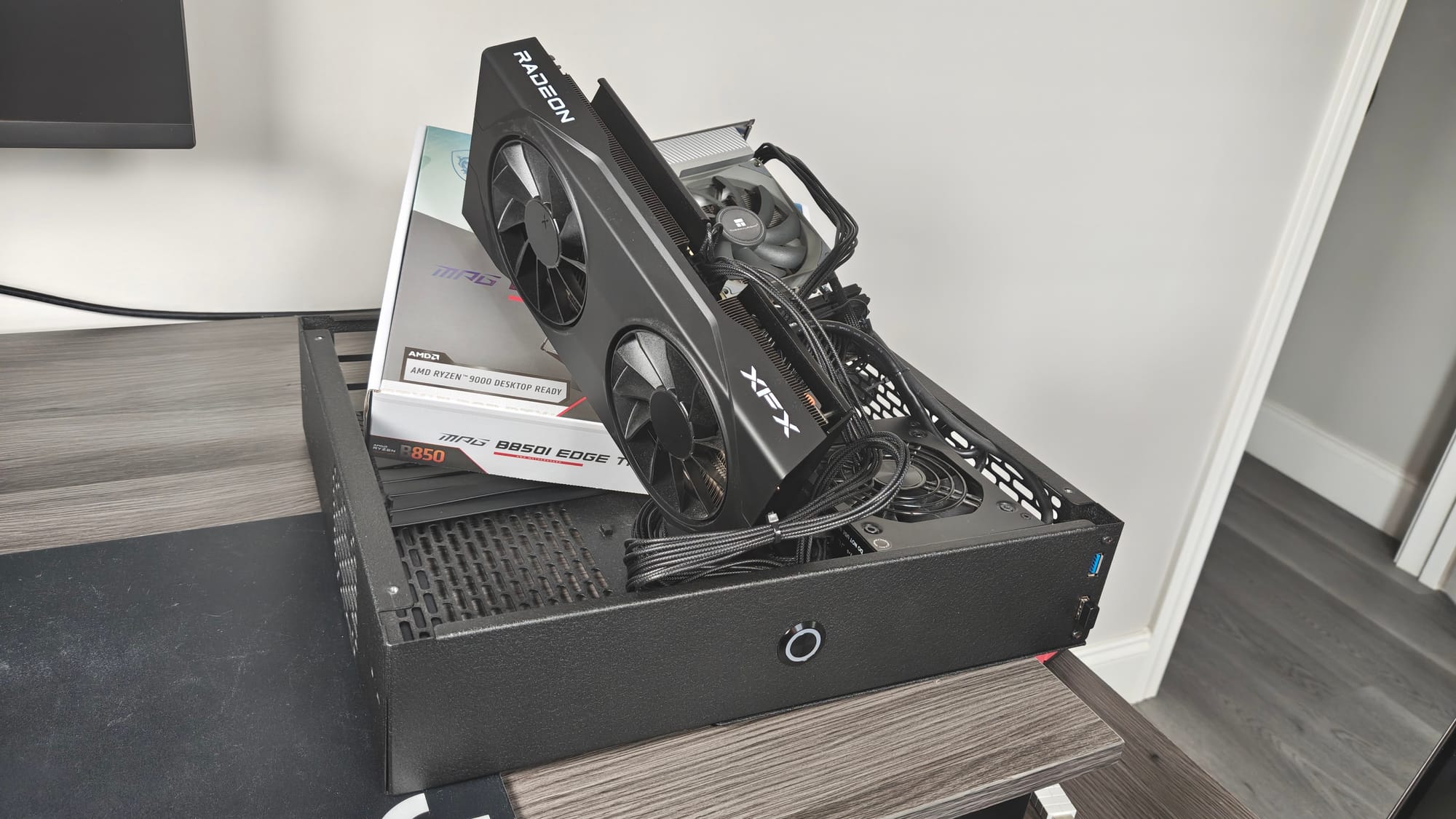
It looks terrible but works just fine as far as I can tell!
And yes, for this test I'm using my actual HTPC and not a test bench, partly because this is more real world, and also because I don't have another desktop or a test bench set up. SI is on a strict budget but thankfully that won't impact the data here.
Inside my HTPC is of course the 9060 XT 8GB, which is an XFX model, plus an MSI B850i motherboard paired with a Ryzen 7 7800X3D, 32GB of DDR5-6000 CL36 memory and a 2TB FireCuda 530R SSD. The only special setting enabled in the BIOS is EXPO for the RAM. This isn't the most recent hardware but I highly doubt I ran into any CPU bottlenecks.
I verified the version of PCIe that the GPU was running at in the BIOS, which is obviously important because it's the whole point of the test. I also tried testing the 9060 XT with the riser cable, and as far as I can tell, it performed the same as when it was directly plugged into the motherboard with the PCIe x16 slot set manually to 4.0.
Also, I’m testing this with Bazzite deck 43 because that’s what I use on this PC. Bazzite deck version 44 did come out recently and it did have optimizations for VRAM usage, but there’s been tons of talk about how buggy it is, so I’m sticking with version 43. I may (probably will) do Windows 11 testing in the future, but I wanted a quick and easy test, so I just stuck with Bazzite.
Anyways, let's take a look at the results.
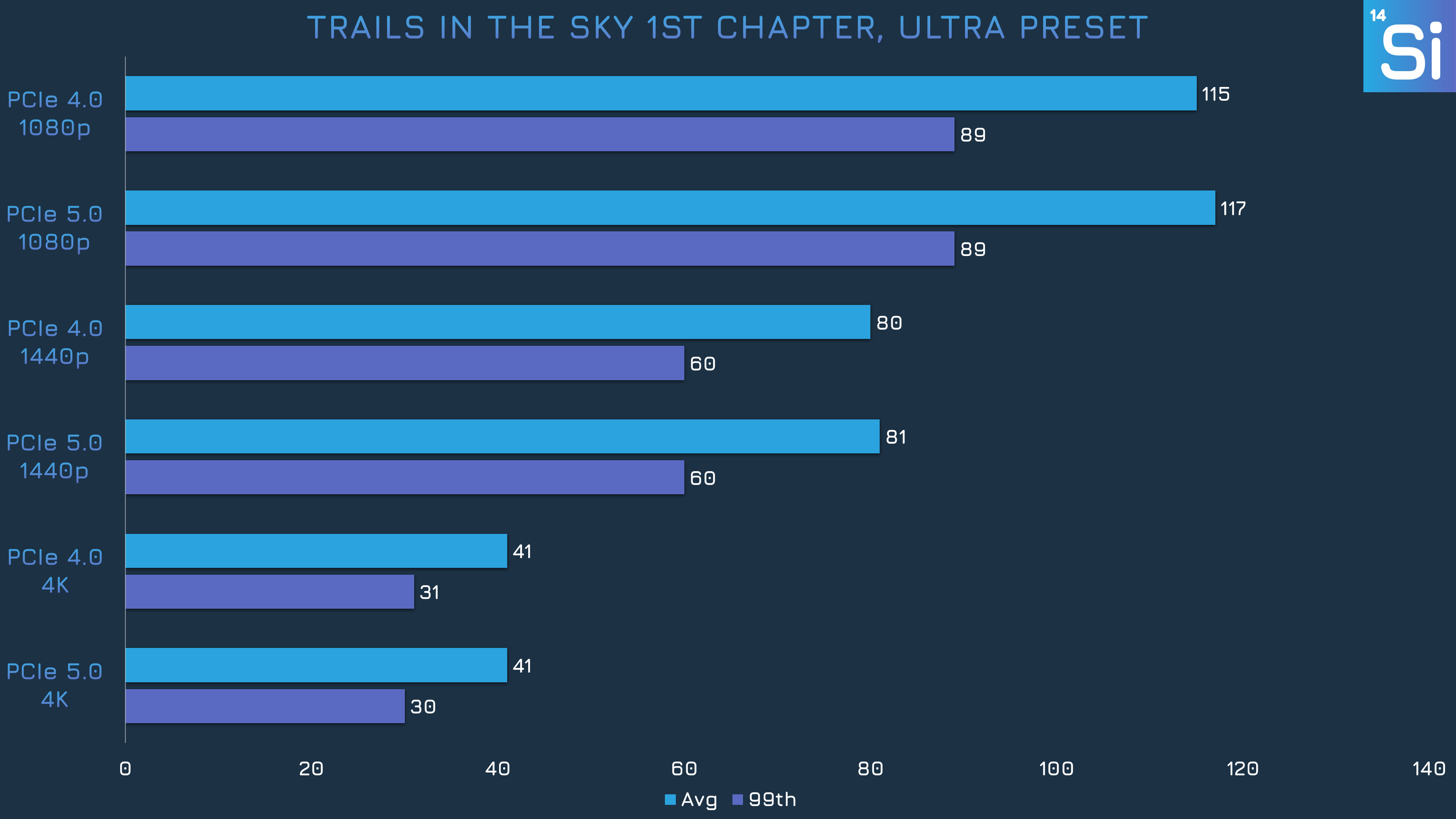
Starting off with Trails in the Sky 1st Chapter, we can see that performance is pretty much the same whether we’re running PCIe 4.0 or 5.0. The 4K results actually had nearly identical numbers, even though I wasn’t using a built in benchmark since one isn’t provided.
My experience playing this game on my own time was actually one of the reasons why I thought maybe the VRAM issue was overblown, because the performance differences between the resolutions felt pretty normal. Ideally, 1440p will only lose about 30% of the framerate compared to 1080p, and 4K will only lose 50% compared to 1440p, which is what we see here.
But this is a AA game that is noted to run well and look pretty good even at low settings. Let's try out some heavier titles.
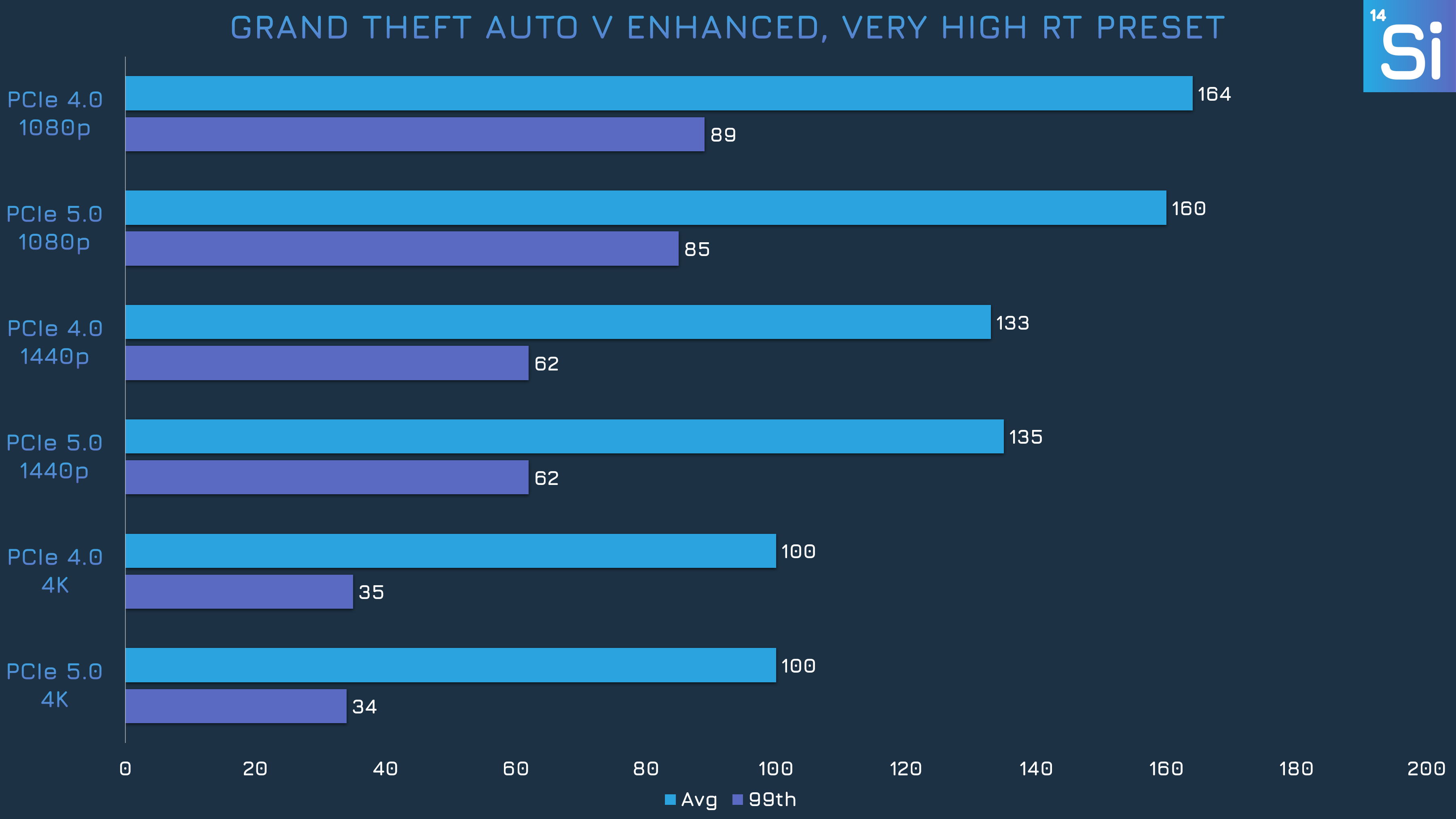
In GTA V Enhanced, we see similar behavior as in Trails. Both PCIe 4.0 and 5.0 performed effectively the same. I kind of expected to see some kind of performance issue here because I was sure 4K would have caused me to run out of memory, especially at the Very High RT preset, but nope, things were mostly fine.
One disclaimer: I recorded performance data from the built-in benchmark, which is composed of a few different segments, and between each one there's a loading screen that runs at like 500 FPS for a few seconds. So all the averages here are higher than what you'd see during the actual gameplay, the 9060 XT wasn't getting 100 FPS at 4K. But at least for the purposes of seeing if PCIe 5.0 is better than 4.0, it's clear that they perform the same.
For a more important benchmark in the future, I'll probably only grab data from the final, longest segment.
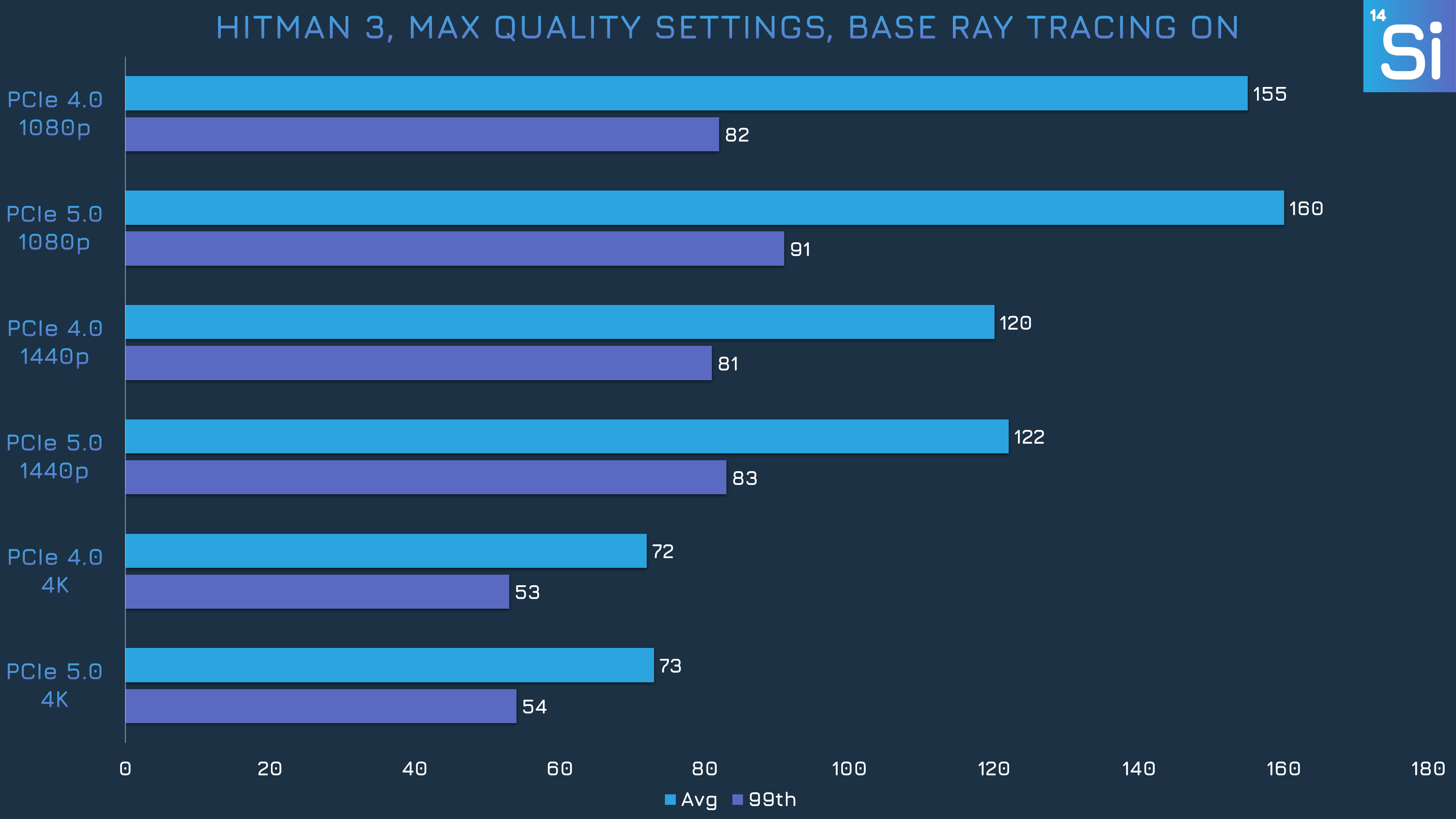
Hitman 3 also didn’t show any performance irregularities. PCIe 5.0 was consistently a little faster, but not by a noticeable margin, so I suspect this is just down to normal run-to-run variances. If I had done more runs, the median would probably be the same for both versions of PCIe. No bottlenecking here.
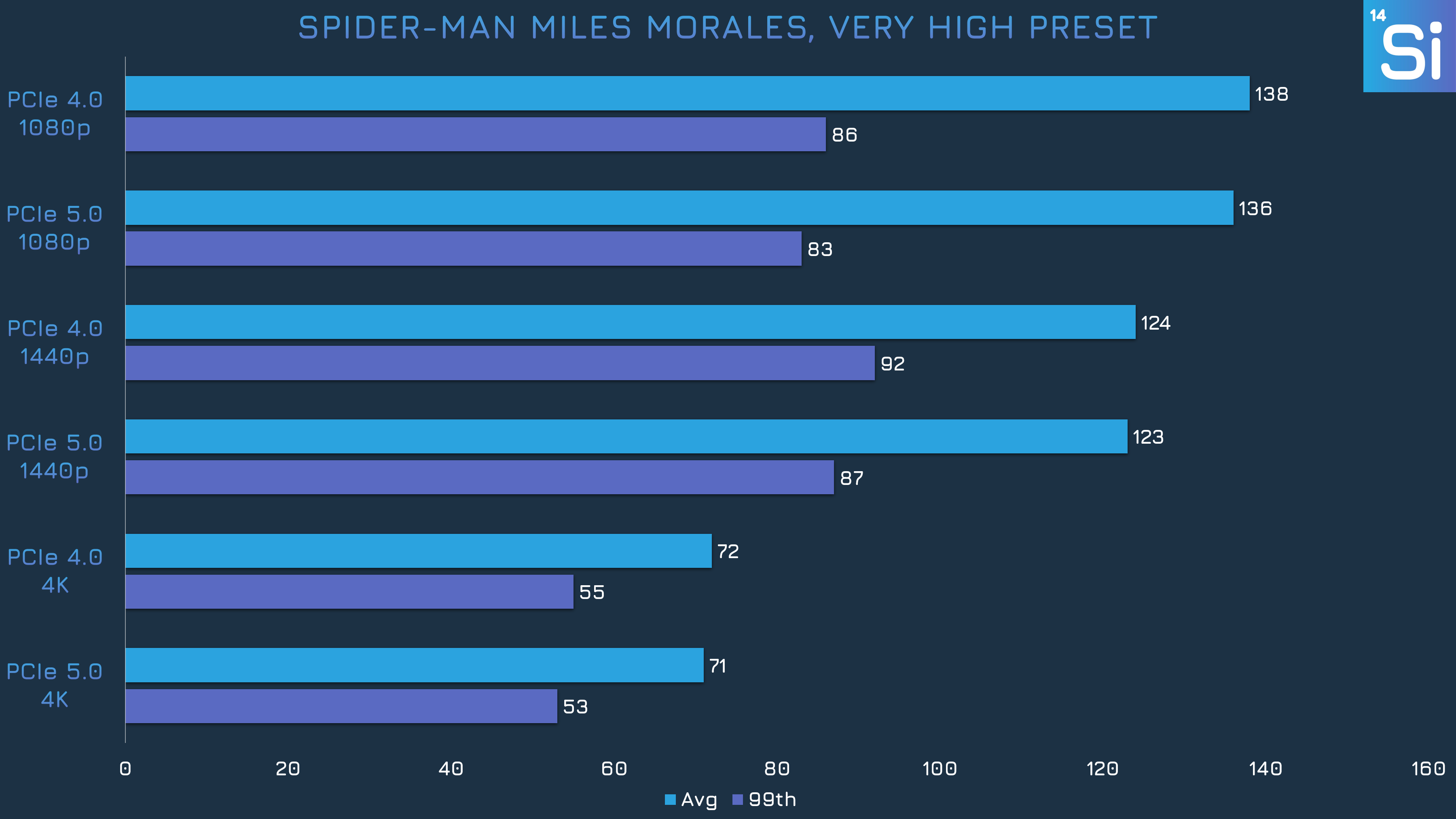
No surprises in Miles Morales, the margins are about as tight as they can realistically be. There was one or two lag spikes in every run, but I mean every run at every resolution no matter the PCIe speed. This didn't happen with the High preset, which I initially tested, so I assume it's something to do with the Very High preset.
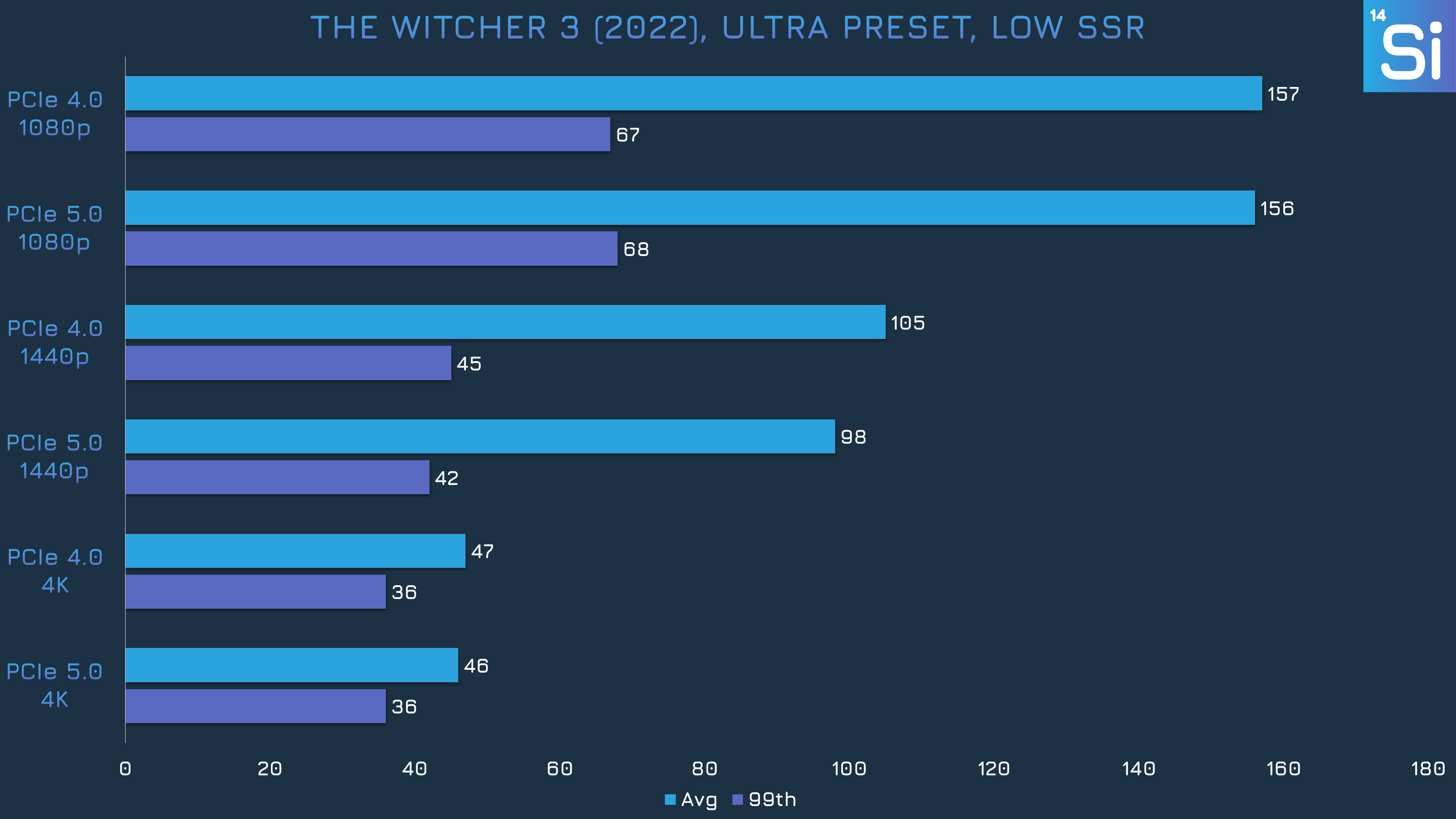
Finally we have the Witcher 3 with the 2022 DX12 update, not the remaster that’s coming out later this year. Yet again, there’s no obvious benefit seen with PCIe 5.0.
So that was a little underwhelming. I just basically tested the same hardware twice and got the same results both times. Going into this, I honestly expected I would see some performance differences at least at 4K, but no, that didn’t happen. We had a couple of games with ray tracing, and that didn’t seem to matter either.
I’m pretty sure my 9060 XT 8GB just never ran out of VRAM. I can’t be 100% sure because I don’t have a 16GB model to compare against, but running out of memory usually causes significant performance problems, and that just didn’t seem to happen. Plus, PCIe 5.0 should have improved performance if the 9060 XT did run out of memory, and both versions of PCIe performed the same, another indication that there was enough memory.
This is very different from what Hardware Unboxed found in their benchmarks, and I have a few ideas on how my testing failed to expose a memory capacity problem when their testing did.
Firstly, I tested on Linux instead of Windows 11, because my real world use case is this Bazzite PC. Maybe Windows 11 just has particularly inefficient VRAM management compared to Linux. Again, I did not test with the new kernel patch that improves VRAM efficiency, so this is the normal level of memory usage users have experienced for about the past year or so on Bazzite.
It could also be down to the games tested since I didn’t benchmark in any of the games HUB did. I don't know if they selected for games that would be more likely to cause issues. My games were also on the older or less intensive side (they're just the best benchmarking games I happen to own), and it’s possible that you don’t have to worry about running out of VRAM in every game, just certain titles.
And this is just a wild guess, but maybe I didn’t benchmark in the way that would have exposed a VRAM capacity issue? I used in game benchmarks when available and tested with actual gameplay for a minute or so if there was no built in benchmark. Maybe I needed to run longer benchmarks, but that makes testing as a whole take much longer, plus errors become more common and larger, and in my experience longer tests don’t seem to improve accuracy.
But I suspect that's not a problem since in my own experience playing these games for an hour or so at a time for fun, I never suddenly experienced severe performance loss.
My conclusion is that you shouldn’t assume that all 8GB GPUs are e-waste. I don’t blame Hardware Unboxed for arguing that these cards are bad, we really should have more memory than 8GB, but it’s definitely not universally true that 8GB isn’t enough. And there is historical precedent for GPUs being paired with insufficient memory, some of you may remember the GTX 970 and its 4GB of VRAM being more like 3.5GB with a half gigabyte of extremely slow cache. But I don't think this is the same situation.
Plus, it costs significantly extra to get cards with more memory, so I can’t say lower capacity versions of cards have no reason to exist. If there is a performance penalty, it’s hopefully (probably?) in line with the cost difference. So if all you can afford is a 9060 XT 8GB or a 5060 Ti 8GB, I suggest testing one out yourself and figuring out if the performance is acceptable, and returning it if it’s not.
I’ll probably revisit this with a test of the same games on Windows 11 to see if maybe Windows just doesn’t use VRAM as efficiently as Linux. If that’s the case, then I guess Linux is the better gaming OS? Let me know if you all would be interested in something like that.
Update 8/29: The original version of this article stated the wrong presets used for Grand Theft Auto V Enhanced and Spider-Man Miles Morales. This has now been corrected.